CPI Data
The CPI Data section of the finPack task pane lets you select a country and CPI series, review the latest available information, and insert the complete CPI history into Excel.
Select a country and CPI series
At the top of the finPack task pane:
- Select a Country.
- Select a CPI Series.
The available CPI series depend on the selected country.
After selecting both values, select Load CPI Data.
finPack retrieves the selected CPI series and displays a series preview.
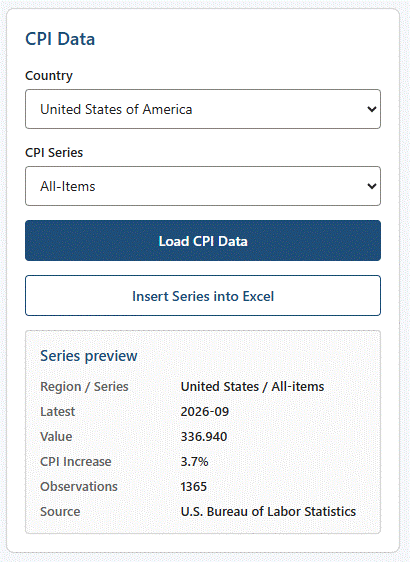
Series preview
The series preview summarizes the selected CPI data.
It includes:
| Field | Description |
|---|---|
| Region / Series | Selected region and CPI series. |
| Latest | Latest available CPI period. |
| Value | CPI value for the latest available period. |
| CPI Increase | CPI change from the same month one year earlier. |
| Observations | Number of CPI observations available in the series. |
| Source | Provider of the CPI data. |
CPI Increase
CPI Increase compares the latest CPI value with the CPI value for the same month one year earlier.
For example, if the latest observation is September 2026, CPI Increase compares:
September 2026
with
September 2025
finPack displays the result as a percentage rounded to one decimal place.
For example:
3.1%
Estimated observations
When an observation has not been published by the provider but has been estimated using the provider's recommended methodology, finPack identifies the value as estimated.
For example:
324.461 (estimated)
Normal published observations do not display an estimated indicator.
Calculations that use one or more estimated observations are identified as includes estimated.
Insert the CPI series into Excel
After loading the CPI data, select Insert Series into Excel.
finPack creates a new worksheet and inserts the complete CPI history into a structured Excel table.
The table contains:
| Column | Description |
|---|---|
| Year | Year of the CPI observation. |
| Month | Month number of the CPI observation. |
| Date | CPI period in YYYY-MM format. |
| Value | CPI value, stored as a numeric value and displayed using the precision configured for the selected CPI series. |
| Estimated | Indicates whether the observation is estimated. |
The newest CPI observation appears first.
The table includes Excel filters, and the header row remains visible when scrolling through the history.
Repeated insertions
If you insert the same CPI series more than once, finPack creates a new worksheet rather than replacing the previously inserted series.
This allows you to preserve an earlier table while inserting another copy of the CPI data.
Data sources
finPack currently provides CPI data for Canada and the United States.
Canadian CPI information originates from Statistics Canada, which publishes CPI information for Canada and other geographic levels.
U.S. CPI information originates from the U.S. Bureau of Labor Statistics, which publishes CPI indexes for the United States and various geographic areas.
Use the Data Sources group on the BPOpti Ribbon to open the providers' CPI websites.
More information about supported countries, CPI series, estimated observations, and providers is available in the CPI Data documentation section.
Related topics
- CPI Value — Retrieve CPI for a specific month.
- CPI Average Change — Compare consecutive average CPI periods.
FINPACK.CPI— Retrieve CPI directly from an Excel formula.FINPACK.CPIINCREASE— Calculate the same-month annual CPI increase directly in Excel.